---
title: Use case with Canal de Isabel II
description: In our use case, you can find out more about the phases carried out for the parameterisation of the objects of Canal de Isabel II and the results obtained.
---
[![BIM&CO-color\[Pantone\] sans baseline (1)-1](https://crm.bimandco.com/hs-fs/hubfs/BIM%26CO-color%5BPantone%5D%20sans%20baseline%20(1)-1.png?width=1168&height=506&name=BIM%26CO-color%5BPantone%5D%20sans%20baseline%20(1)-1.png "BIM&CO-color[Pantone] sans baseline (1)-1")](https://www.bimandco.com/bim/fr/)

# How to set up BIM objects under commonly used standards?
Canal de Isabel II, S.A. is the Spanish public company that manages the entire water cycle in the Community of Madrid.
Canal de Isabel II, S.A. has already begun a BIM implementation process, convinced of the possibilities and advantages that the use of this methodology can offer in its procedures. One of the objectives of this implementation process is to have a library of parameterised BIM objects.
In our use case, you can find out more about the phases carried out for the parameterisation of the objects and the results obtained.
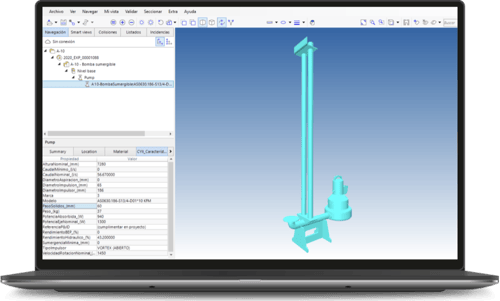

What you'll discover in this use case :
✅ Promoting innovation and digital transformation.
✅ The origins of the project: the Canal BIM Group.
✅Project objective: to analyse the applicability and potential of parameterisation of object properties in BIM models.
✅ Perspective on the delivery of parameterised objects with Onfly.
Discover other use cases and white papers!
[.png?width=160&height=216&name=Whitebook%2010%20steps%20EN%20(2).png "Whitebook 10 steps EN (2)")](https://crm.bimandco.com/en/how-to-build-a-bim-library-in-10-steps?utm_source=maillage-interne&utm_medium=hubspot&utm_campaign=whitebook-10etapes-en&utm_content=EN&hsLang=en)
**How to create a BIM library in 10 steps?**
An indispensable guide for anyone who wants to build a solid **library of BIM content** in their company, in 10 useful steps.
[](https://crm.bimandco.com/en/connecteur-revit?utm_source=maillage-interne&utm_medium=hubspot&utm_campaign=whitebook-pluginrevit-062022-en&utm_content=EN&hsLang=en)
This Revit & Onfly connector is aimed at design offices, architects and installers worldwide.
Verified conformity of BIM objects, optimised searches? Discover how to facilitate all your BIM projects!
[.png?width=160&height=216&name=WB%20%C3%A9quipe%20EN%20(1).png "WB équipe EN (1)")](https://crm.bimandco.com/en/how-do-you-create-a-bim-object-library-team?utm_source=maillage-interne&utm_medium=hubspot&utm_campaign=whitebook-equipebibliotheque-en&utm_content=EN&hsLang=en)
To help you set up a BIM library team efficiently, we offer you a practical guide that is very easy to implement.
This document will be useful for all those who wish to set up a team within their company, dedicated to managing BIM object libraries.
The clients who trust us







![Apogea_logotipo_color\[77\]](https://crm.bimandco.com/hs-fs/hubfs/Apogea_logotipo_color%5B77%5D.png?width=90&height=37&name=Apogea_logotipo_color%5B77%5D.png "Apogea_logotipo_color[77]")

Let's connect!
© 2026 -
Copyright BIM&Co – All Rights reserved.